


UNest: Invest & Save for Kids
3.8430.00 Reviews
App Specs
- Version
- 3.8.1
- Updated On
- License
- Free
- Downloads
- 100,000+
- Developer
- UNest Holdings, Inc.
- Categories
- Finance
- Platform
- Android
Screenshots
 Analysis by AppCompare
Choosing a way to invest for a child is less about finding a clever-looking app and more about deciding what kind of account, routine, and family involvement you can actually maintain. I’d start by asking whether you want a dedicated place for a child’s future, whether you’re comfortable with investing rather than simply setting cash aside, and whether relatives might want to contribute. UNest: Investing for Your Kids is aimed at that specific family-finance job, so it makes most sense when those needs line up.
It’s a finance app from UNest Holdings, Inc., and its focus is investing for children rather than tracking a household budget or managing every part of an adult’s portfolio. That narrow purpose is useful: I wouldn’t have to turn a general-purpose money app into a child-savings system by hand. The trade-off is equally clear. If you only want a basic savings account, investment choices, account rules, and market ups and downs may be more complexity than you need.
Choose the account style before choosing the app
Before setting up any child-focused investment account, I’d talk through the practical question of who will manage it and what the money is intended to support. A custodial account is not just a labelled jar for school costs; it is an investment account held for a child, with an adult managing it. That distinction matters if you’re comparing this approach with a bank savings account, where the experience is usually more familiar and the balance is not exposed to market movement in the same way.
I’d also consider how much flexibility you want over the years. A long-term account can be a good fit for a family that has a clear purpose and can leave contributions invested, but investing is not the same as promising a particular outcome. If you might need the money soon, or would be uncomfortable seeing its value fluctuate, I’d compare a cash-saving option carefully before deciding. The best choice is the one whose rules and risks you understand well enough to stick with.
Where UNest makes family contributions easier
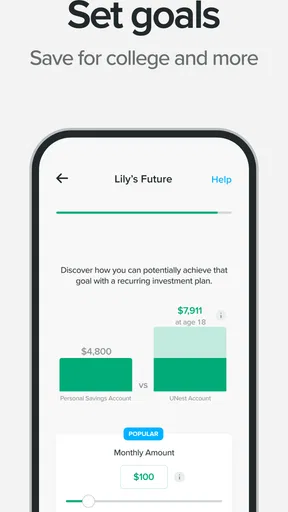
The app’s most distinctive practical angle is bringing contributions into one child-focused routine. Its recurring contribution plan can help turn an intention into a habit: I’d choose an amount that still feels comfortable in a month with extra bills, rather than setting an ambitious target that I might cancel. The useful test is not whether the first contribution feels impressive, but whether the plan remains manageable through ordinary changes in family spending.
The gifting option addresses another real-world snag. Relatives often ask what they can give a child, and a contribution toward a future goal can be more purposeful than another toy. I’d share the idea with family in a low-pressure way and make the intended purpose clear, so nobody assumes the account works like a general gift card or that a contribution gives them control. That small conversation can prevent awkward expectations later.
A realistic use case might be a parent who gets paid monthly, wants to make a modest contribution after checking the household budget, and has grandparents who would rather support a longer-term goal than choose a present. The parent can use a recurring plan for their own routine and invite relatives to take part when appropriate. I’d still review the contribution amount occasionally: automation saves memory, not judgement, and a plan should be adjusted if income or priorities change.
Worth Reading Before You Choose

EA SPORTS FC Mobile 26 Is a Bigger Football Game, but It Takes Time

Flipboard Shows What News Apps Must Do Beyond the Feed

Switching to Android Auto Means Rethinking Your Driving Routine

Google Calendar Makes a Crowded Week Easier to Manage

Ludo King Makes the Most of the Minutes Between Plans

Baby Panda World Brings Quick Play to Modern Phones, but Its Game Library Feels Busy
When a different route may suit you better
Compared with a standard savings account, an investment-focused app is a better match when the family accepts uncertainty and is planning over a longer horizon. A savings account may be the calmer choice for money that needs to stay predictable or could be used soon. Compared with a broad investing platform, a child-focused app may feel easier to approach if the main goal is a child’s account rather than a wider portfolio. A broader platform may be preferable if you want to manage several kinds of investments together or already have a process you trust.
I would also skip this app if you’re looking for a complete family budget, debt tracker, or one-stop financial dashboard. Its purpose is more specific than that. And if you’re not ready to decide what kind of account you want, I’d do that research first instead of treating a quick sign-up as a substitute for understanding the arrangement. A simple cash account or a conversation with a qualified financial professional may be a better starting point, depending on your situation.
What to check before you commit
There are a few practical questions I’d answer before making this part of a family routine. First, check the account terms and understand who controls the account and how the money is intended to be used. Second, look at the app’s current fees and any purchase options before committing; the app is free to download, but it includes in-app purchases ranging from $4.99 to $149.99 per item. Third, decide whether you want recurring contributions, occasional deposits, or gifts from relatives, and make sure the plan fits your budget without relying on best-case assumptions.
Moving an existing arrangement can take more thought than opening a new app. Before switching, I’d compare the account type and terms, consider any costs or administrative steps involved, and avoid closing an existing account until I understand the consequences. If you’re only testing whether a child-focused investing routine works for your household, starting with a contribution you can comfortably sustain is more useful than moving everything at once.
It’s free to download and rated for everyone, though that audience label does not mean every financial decision is simple or suitable for every family. The app has an average rating of 3.8 from around 2,500 ratings, alongside 431 written reviews, and has passed 100,000 installs. It was released on November 27, 2019; version 3.1.3 supports devices running Android 7.0 or later. Those details give a sense of its availability and reception, but I’d treat ratings as background rather than a substitute for checking whether its account approach fits your plans.
What if you only want to save cash? I’d compare a bank account or another cash-based option instead of choosing an investment app by default. What if relatives want to contribute? The gifting feature gives the family a route to participate, but I’d explain the purpose and boundaries of the account before inviting anyone. And what if you’re unsure about investing for a child at all? Take time to compare account types and terms first; a finance app can make a process easier to follow, but it cannot make the underlying decision for you.
For me, the clearest reason to consider UNest is that it brings a child-focused investment account, recurring contributions, and family gifting into one focused experience. Its clearest limitation is that this focus won’t replace a broader financial tool, and an investment account won’t suit every time horizon or comfort level. I’d choose it if I wanted a dedicated, repeatable way to invest for a child and had already thought through the account structure. I’d choose a simpler savings route if certainty and easy access mattered more.
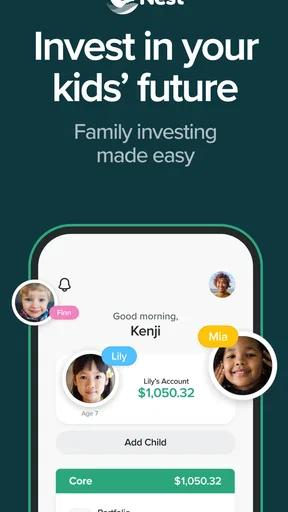
Ever thought about how to take a smart step towards securing your kids’ future without feeling like you need a finance degree? Well, UNest might just be the app you’re looking for. I recently took it for a spin, and I’m here to spill the beans on what it’s like to use this app.
Getting Started with UNest
First things first, let’s talk about the setup. I was pleasantly surprised by how straightforward it was to get started. You know how some apps feel like they’re trying to quiz you into oblivion before you can even get started? Not this one. Setting up an account was a breeze. I just needed a few basic details, and I was ready to dive into the world of investment for my little one.
One thing I noticed right away is the app’s friendly interface. It’s like they’ve taken the complex world of investing and wrapped it up in a cozy blanket. You’re guided through each step, and there’s no jargon to make your head spin. It’s all about making investing accessible, and I could totally vibe with that.
Features That Stand Out
Now, onto the juicy bits — the features. UNest offers a variety of investment options tailored for kids. You can set up a custodial account, which is a fancy way of saying you’re investing in your child’s future while you keep control of the account. It’s a pretty sweet deal when you think about it.
The app also lets you set up a recurring contribution plan. This means you can automate your savings without having to remember to do it every month. For someone like me, who sometimes forgets to water the plants, this feature is a lifesaver.
And let’s not forget the gifting feature. You can invite family and friends to contribute to your child’s future. It’s a great way to rally the troops and get everyone involved in supporting your kid’s dreams.
User Experience and Usability
In terms of user experience, I found UNest: Investing for Your Kids to be pretty top-notch. The app runs smoothly without those annoying lags, and navigating through the different sections is as easy as pie. They’ve done an excellent job at making sure everything you need is just a tap away.
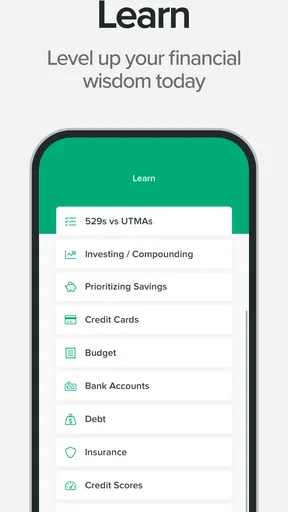
I also appreciated the educational resources sprinkled throughout the app. They’ve got these neat little tips and explanations that help you understand the why and how of investing. It’s like having a mini financial advisor in your pocket, which is cool if you’re new to all this.
Security and Trust
Security is always a biggie when it comes to financial apps. I felt pretty secure using UNest, knowing that they use bank-level encryption to protect sensitive information. Plus, they’re transparent about their practices, which adds a layer of trustworthiness.
When it comes to customer support, they’ve got your back. I reached out with a couple of questions, and their response was prompt and helpful. It’s always reassuring to know you’re not left hanging when you need assistance.
Final Thoughts
So, what’s the verdict? I’d say UNest is a fantastic tool for parents who want to get a head start on their kids’ financial future. It’s user-friendly, packed with useful features, and offers peace of mind with its robust security measures.
In a world where planning for the future can feel daunting, this app simplifies the journey. Whether you’re an investment newbie or a seasoned pro, UNest has something to offer. So go ahead, give it a whirl, and take that first step towards your child’s bright future.
Pros
- User-friendly interface for all ages.
- Automated investment options available.
- No account fees for small balances.
- Educational resources for parents.
- Flexible contribution options.
Cons
- Limited investment choices available.
- Requires bank account for setup.
- No cryptocurrency investments.
- Higher fees for larger balances.
- Mobile app only
- no desktop version.
FAQs for UNest: Invest & Save for Kids
What is UNest and how does it work?
UNest is a mobile app designed to help parents save and invest for their children's future. It offers a user-friendly platform where you can set up a tax-advantaged custodial account, automate contributions, and invest in a range of portfolios tailored to your financial goals. The app simplifies the investment process, making it accessible for parents who want to secure their child's future.
Is UNest safe and secure to use?
Yes, UNest prioritizes the safety and security of your investments. The app uses bank-level encryption to protect your personal and financial information. Additionally, accounts are insured up to $500,000 by the Securities Investor Protection Corporation (SIPC), providing an extra layer of security for your investments.
What fees are associated with using UNest?
UNest charges a monthly subscription fee, which varies depending on the level of service you choose. This fee covers account management, portfolio customization, and ongoing support. It's important to review the fee structure to ensure it fits within your budget and aligns with your financial goals.
Can I control the investment portfolios within UNest?
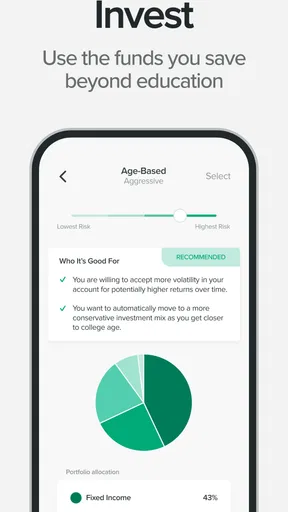
Yes, UNest allows you to select from a range of portfolio options that align with your risk tolerance and financial objectives. These portfolios are professionally managed and automatically rebalanced to optimize performance. You can adjust your preferences at any time through the app to ensure your investments remain aligned with your goals.
Who can contribute to my child's UNest account?
In addition to parents, UNest allows family members and friends to contribute to your child's account. The app provides a gifting feature, where others can easily send funds directly to your child's investment account, making it a perfect gift for birthdays or special occasions. This collaborative approach helps maximize savings potential.


